Please note that only Gift Cards or Store Credit codes issued by KICKS CREW can be applied to purchases.
Steps to Redeem Your Gift Card or Store Credit
- Select your desired item, choose your size, and proceed to checkout.
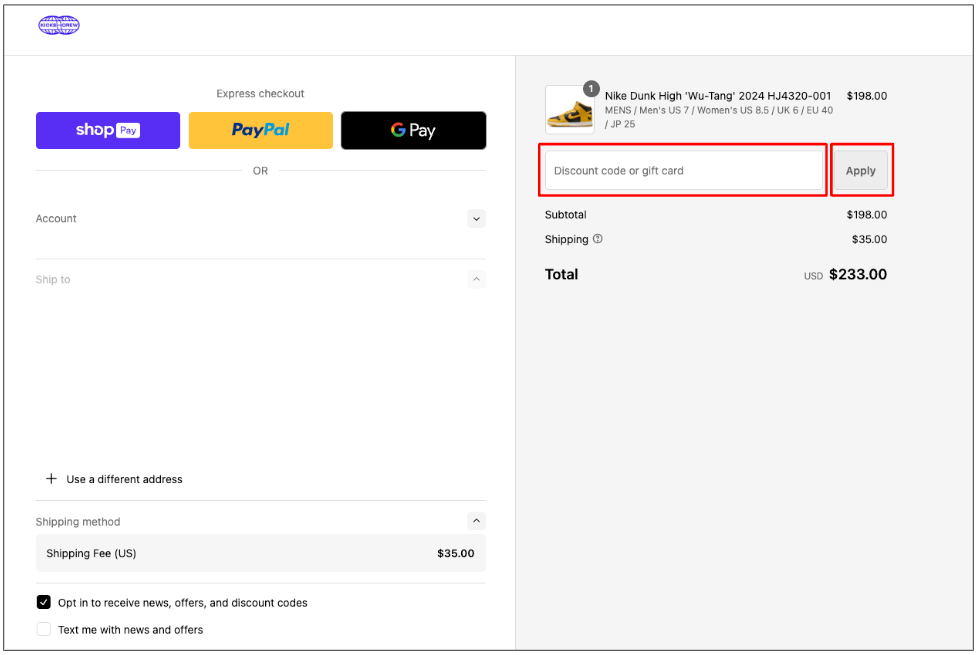
- Enter your Gift Card or Store Credit code in the designated field under the order summary, then click "Apply".
- The discount will be reflected in your order total automatically.
- Complete checkout by entering your contact and shipping information, then click "Pay Now".
Currency Conversion
If your Gift Card or Store Credit is issued in a different currency from the one used for your order, the amount will be automatically converted to the required currency using the applicable exchange rate.
Important Notes
- Only one valid Gift Card or Store Credit code may be applied per order, unless otherwise stated.
- Gift Cards and Store Credit are non-transferable and cannot be exchanged for cash.
- All Gift Card and Store Credit codes are subject to their own Terms & Conditions.
Was this article helpful?
That’s Great!
Thank you for your feedback
Sorry! We couldn't be helpful
Thank you for your feedback
Feedback sent
We appreciate your effort and will try to fix the article